
It's common to see developers trying to solve performance issues by adding useMemo, useCallback, and memo to almost every component.
The problem is that, in most React applications, these hooks are not the primary source of performance improvements.
Before optimizing components, there are usually much larger bottlenecks, such as oversized bundles, heavy images, unnecessary re-renders, and repeated API requests.
Pages that take too long to load, interfaces that freeze during user interactions, and unnecessary re-renders can frustrate users and even reduce a product's conversion rate.
Additionally, performance also impacts metrics such as Core Web Vitals, which Google uses as a ranking factor in search results.
Read more about Core Web Vitals here.
In practice, performance optimization is a process, not just a collection of hooks.
In this article, we'll explore the main techniques for improving the performance of React applications, understand when each optimization makes sense, and, most importantly, learn how to identify bottlenecks before writing any optimization code.
Where Should You Start Optimizing?
One of the most common questions is knowing what to optimize. In medium to large applications, it's common to think about starting with the largest component, the biggest page, or the one with the most API requests. However, all of these only reflect the application's structure, not necessarily its biggest bottlenecks.
Several tools can help identify where these bottlenecks are and what can be improved, including:
- Chrome DevTools Performance
- React DevTools Profiler
- Lighthouse
- Web Vitals Extension
- Bundle Analyzer
These tools help us understand which components are rendering most frequently, how long each render takes, and what the page's LCP time is.
With this information, we can focus on reducing the bundle size or improving the Core Web Vitals LCP metric.
Reduce the Final Bundle Size
In a Single Page Application (SPA), all JavaScript, CSS, and HTML are transformed and bundled into the final output—a .js file that contains all the application's logic and must be executed by the browser.
The larger the final bundle, the heavier it becomes.
We can use tools such as Webpack Bundle Analyzer or Vite Bundle Analyzer to analyze the size of the final bundle, its largest dependencies, assets, and components.

In many cases, reducing the bundle size provides a much greater performance improvement than optimizing component renders.
Lazy Load Components
We can load heavy and/or non-critical components only when they're actually needed, such as modals, charts, maps, or dashboards, using React's lazy.
import { lazy, Suspense } from "react";

const Modal = lazy(() => import("./Modal"));

function App() {
  return (
    <Suspense fallback={<p>Loading...</p>}>
      <Modal />
    </Suspense>
  );
}
This way, the JavaScript for Modal is loaded only when the user clicks the button that opens it.
Code Splitting
Another benefit of Lazy Loading is splitting the final bundle into smaller files that are loaded on demand.
Frameworks and routing libraries such as React Router allow each route to be loaded independently.
const Settings = lazy(() => import("./pages/Settings"));
This way, users only download the code required for the page they're currently visiting.
Remove Unnecessary Dependencies
Many applications import large libraries while only using a small portion of them.
For example, instead of importing the entire library:
import _ from "lodash"; // 71.5k imported

// _.debounce() Only debounce is used
Prefer importing only the function you need.
import debounce from "lodash/debounce"; // 3.4k imported
Or, whenever possible, use native JavaScript APIs.
VS Code extensions such as Import Cost display the size of imported libraries.

Avoid Unnecessary Re-renders
Whenever a state or prop changes, React re-renders the affected components. In most cases, this is the expected behavior.
The problem arises when components re-render repeatedly even though their visual output hasn't changed. In large applications, this can have a significant performance cost.
React provides several APIs and hooks that help mitigate this issue, such as memo, useMemo, and useCallback.
React.memo
React's memo API prevents a component from re-rendering if its props haven't changed.
import { memo } from "react";

function UserCard(props) {
  return <p>{props.name}</p>;
}

export const MemorizedUserCard = memo(UserCard);
Without memo, the component re-renders every time its parent re-renders. With it, React compares the props and reuses the previous rendered result if nothing has changed.
This strategy is particularly useful for:
- Large components;
- Components that are reused multiple times;
- Components that receive stable props.
React.useMemo
The React.useMemo hook caches the result of an expensive computation to avoid recalculating it on every render. The function is only executed again when one of its dependencies changes.
const sortedUsers = useMemo(() => {
  return [...users].sort(compareUsers);
}, [users]);
Without it, the sorting operation would run on every render.
However, avoid using React.useMemo for simple operations, as its own overhead may outweigh the benefits, as shown below.
const isAdmin = useMemo(() => role === "admin", [role]); // useMemo is unnecessary here.
React.useCallback
Functions are recreated on every render, and in most cases, this isn't a problem. However, when a function is passed to child components via props, a new function reference may trigger unnecessary re-renders.
const handleClick = useCallback((user) => {
  saveUser(user);
}, [saveUser]);

<ChildComponent handleClick={handleClick} />
useCallback preserves the same function reference as long as its dependencies don't change.
Like useMemo, useCallback should only be used when it provides a measurable performance benefit.
React Compiler
To reduce the excessive use of useMemo, useCallback, and memo, recent versions of React introduced the React Compiler.
In practice, the compiler can automatically identify and apply optimizations during compilation, reducing the need for manual memoization.
Although it's still being adopted across the ecosystem, it's expected to significantly simplify React performance optimization in the future.
Use Stable Keys
When rendering lists with map, React uses the key prop to identify each element between renders. This allows React's reconciliation algorithm to determine which items were added, removed, or updated, avoiding unnecessary re-creation of the entire list.
A common mistake is using the array index as the key:
{users.map((user, index) => (
  <UserCard key={index} user={user} />
))}
Although this works for static lists, it can lead to incorrect rendering when items are inserted, removed, or reordered. It can also cause React to reuse components incorrectly.
Whenever possible, use a unique and stable identifier, such as the object's ID:
{users.map((user) => (
  <UserCard key={user.id} user={user} />
))}
With a stable key, React can reuse existing components more efficiently, reducing the amount of work performed during reconciliation while correctly preserving each item's state.
Virtualize Large Lists
Rendering hundreds or thousands of elements simultaneously can significantly impact performance. One solution is to use list virtualization.
Libraries such as react-window and TanStack Virtual render only the elements currently visible on the screen—typically around 20 or 30—instead of rendering thousands.
Here's an example using TanStack Virtual.
List with 10.000 items
Optimize Images
In many applications, images account for the largest amount of data downloaded by the browser.
Some best practices include:
- Using modern formats such as WebP or AVIF.
- Compressing and resizing large images.
- Serving different image sizes based on the user's device.
- Using a CDN for static assets.
- Lazy loading images (loading them only when they enter the viewport).
Example:
<img
  src="hero.webp"
  loading="lazy"
  alt="Hero image"
/>
Cache API Requests
Making repeated API requests increases response times and network usage, even though the data often doesn't change frequently.
Libraries such as React Query and SWR provide features like:
- Automatic caching.
- Request deduplication.
- Background updates.
- Data synchronization.
- Automatic request cancellation.
Example using React Query:
const { data } = useQuery({
  queryKey: ["users"],
  queryFn: fetchUsers,
  staleTime: 1000 * 60 * 5, // Data is considered fresh for 5 minutes (it won't be refetched during this period)
  gcTime: 1000 * 60 * 10, // Unused cached data remains in memory for 10 minutes
});
Cancel Outdated Requests (Debounce & AbortController)
A good practice is to add debounce to functions that interact with an API multiple times in response to user actions.
A classic example is a search input. Instead of sending a request on every keystroke, we can wait a few milliseconds for the user to finish typing before sending the request to the server.
Besides making the interface more responsive, this also reduces the number of requests processed by the API.
You can implement this using setTimeout with clearTimeout or the debounce function from Lodash.
Another good practice is to use AbortController to cancel requests that are no longer needed. By using AbortController, only the most recent request remains active, preventing race conditions and avoiding outdated data from being rendered in the UI.
import { useEffect, useRef, useState, startTransition } from "react";

export default function Search() {
  const [search, setSearch] = useState("");
  const [users, setUsers] = useState([]);

  const timeoutRef = useRef<ReturnType<typeof setTimeout> | null>(null);

  useEffect(() => {
    const controller = new AbortController();

    if (timeoutRef.current) {
      clearTimeout(timeoutRef.current);
    }

    timeoutRef.current = setTimeout(async () => {
      const response = await fetch(
        `/api/users?search=${encodeURIComponent(search)}`,
        {
          signal: controller.signal,
        }
      );

      const data = await response.json();

      startTransition(() => {
        setUsers(data);
      });
    }, 500);

    return () => {
      if (timeoutRef.current) {
        clearTimeout(timeoutRef.current);
      }
      controller.abort();
    };
  }, [search]);

  return (
    <>
      <input
        type="text"
        placeholder="Search users..."
        value={search}
        onChange={(e) => setSearch(e.target.value)}
      />

      <ul>
        {users.map((user) => (
          <li key={user.id}>{user.name}</li>
        ))}
      </ul>
    </>
  );
}
Mark State Updates as Non-Urgent
In the previous search example, updating the input value should happen immediately to keep typing smooth, while rendering the list of users is a more expensive operation that can wait.
In these situations, React provides the startTransition API, which allows you to mark state updates as non-urgent. This enables React to prioritize critical updates, such as user interactions, while scheduling less important updates to run when resources are available.
The result is a more responsive interface, especially in applications with large lists, complex filters, or expensive rendering.
Read more about the startTransition hook here.
Keep State Close to Where It's Used
Another common mistake is storing state too high in the component tree while only using it in child components through prop drilling.
Consider the following structure:
App
├── Header
├── Sidebar
└── Dashboard
If a state stored in App is updated, the entire component tree may re-render.
Whenever possible, keep state as close as possible to the components that actually need it.
Global State
Global state solutions such as Context, Redux, and Zustand are excellent for storing, organizing, and sharing data across an application. However, the same principle applies: only subscribe to the state you actually use to avoid unnecessary re-renders.
Use the React Profiler
The React DevTools browser extension includes a tool called Profiler, which can be used in React applications to visualize:
- Which components rendered.
- How long each render took.
- How many times they rendered.
- Why they rendered.
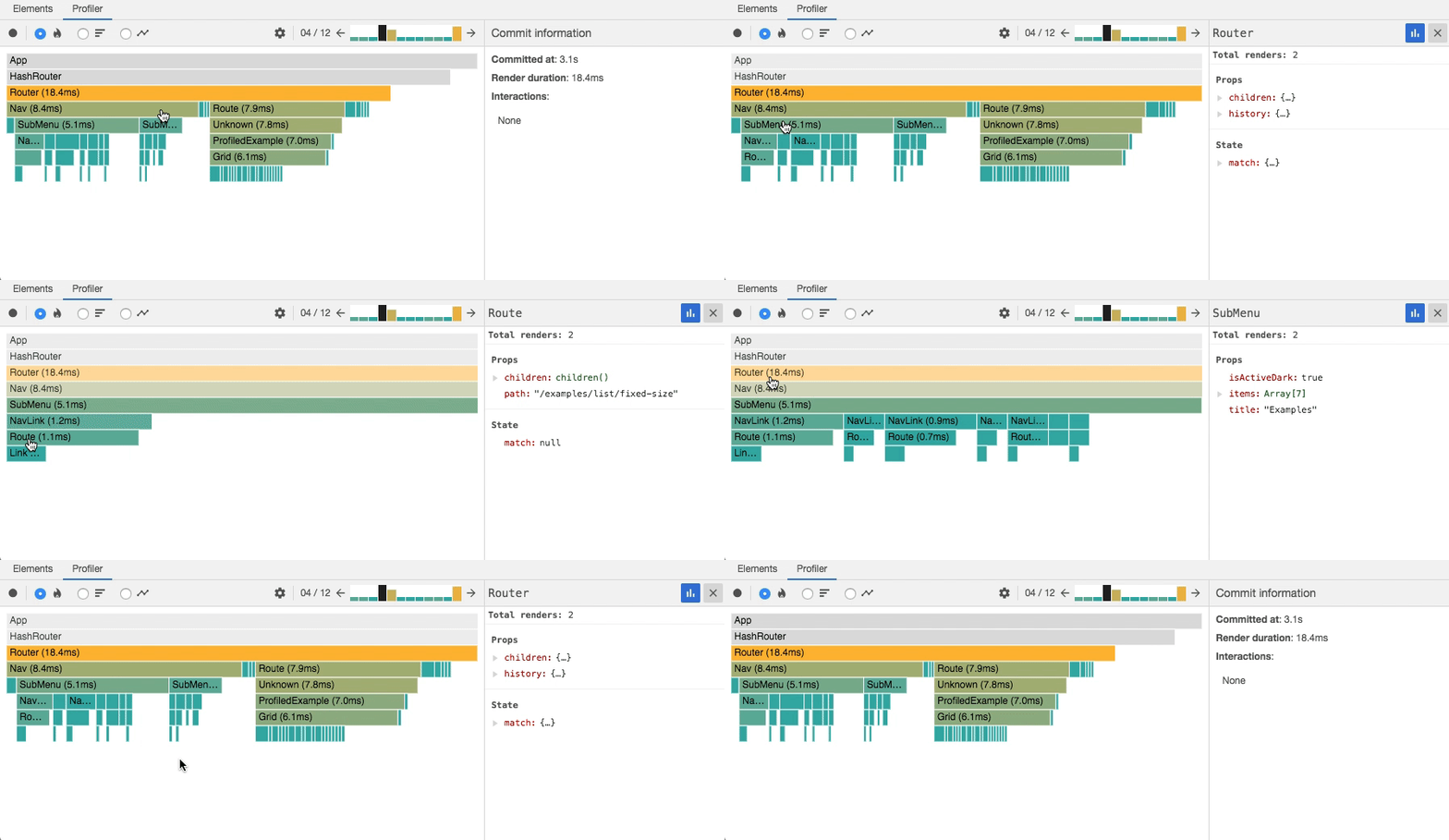
Instead of optimizing through trial and error, use the Profiler to make data-driven decisions.
Consider Server-Side Rendering (SSR)
Not every performance issue should be solved on the client side. Modern frameworks such as Next.js, Remix, and TanStack Start allow you to fetch data and render pages on the server before sending them to the browser.
This improves the LCP (Largest Contentful Paint) metric, reduces the amount of JavaScript executed in the browser, and delivers pages instantly to users, avoiding loading states and providing a better user experience.
Conclusion
React already provides excellent performance out of the box. However, building truly fast applications requires understanding how the rendering process works and knowing how to identify the real bottlenecks.
Before adding useMemo, useCallback, or memo, measure your application using tools such as React Profiler and Lighthouse. In many cases, reducing the bundle size, optimizing images, caching API requests, and avoiding unnecessary re-renders provide much greater improvements than adding memoization to every component.
Improving performance is a continuous process. New features, dependencies, and components can introduce regressions over time, so a good optimization workflow consists of:
- Measure.
- Identify the bottleneck.
- Apply the appropriate optimization.
- Measure again.
This process ensures that every optimization delivers real results. Ultimately, performance isn't about adding more hooks—it's about making the browser do less work.