In today's web development landscape, user experience (UX) and performance are no longer just competitive advantages—they determine the success of a digital product. A fast and stable website retains more users, converts better, and earns valuable ranking signals from search engines. This is where Core Web Vitals come in.
Summary
- What are Core Web Vitals?
- The Main Metrics
- 1. LCP (Largest Contentful Paint) — Loading Performance
- Tips to Improve LCP
- 2. INP (Interaction to Next Paint) — Responsiveness in Interaction
- Tips to Improve INP
- 3. CLS (Cumulative Layout Shift) — Visual Stability
- Tips to Improve CLS
- How to Measure Core Web Vitals
- Core Web Vitals and Modern Frameworks
- Benefits of Optimization
- Conclusion
What are Core Web Vitals?
The Core Web Vitals is a Google initiative that establishes a set of unified metrics to evaluate the quality of the user experience on the web.
Instead of focusing only on abstract technical metrics, the emphasis is on human perception: how fast the page loads visually (LCP), how fast it responds to interactions (INP), and how stable it remains while rendering (CLS).
The Main Metrics
Currently, the Core Web Vitals is composed of three fundamental pillars:
1. LCP (Largest Contentful Paint) — Loading Performance
The LCP measures the time it takes for the largest content element visible in the viewport to be fully rendered, typically a featured image, a banner, or a large text block, from the moment the page starts loading.
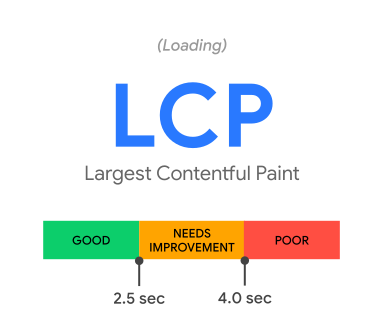
- Good: Up to 2.5 seconds.
- Needs Improvement: Between 2.5 and 4.0 seconds.
- Poor: Above 4.0 seconds.
Remembering the steps of the browser to render a page:
1 - The browser receives the HTML of the page.
2 - It builds the DOM tree (Document Object Model).
3 - It downloads the CSS and JS files referenced in the HTML.
4 - It builds the CSSOM tree (CSS Object Model).
5 - Finally, it combines the DOM and CSSOM to render the page on screen.
As you can see, the browser has certain work to do until it renders the page, and all of this affects the loading time and consequently the LCP.
Tips to Improve LCP:
- Image Optimization: Use modern formats (WebP, AVIF), implement
srcsetfor responsive sizes, reduce very large images, and use compression tools. - Resource Prioritization: Add the
fetchpriority="high"attribute to your main image (LCP) and use<link rel="preload">for critical files. Avoid lazy-loading the featured image. - Reduce TTFB (Time to First Byte): Optimize server response time, implement effective caching strategies, and use a CDN (Content Delivery Network).
- Minify Code: Reduce the size of CSS and JS files to speed up download times.
- Avoid Render Blocking: Scripts and styles that block rendering should be loaded asynchronously or deferred.
- Use Optimized Fonts: Prefer system fonts or use techniques like
font-display: swapto avoid render blocking.
2. INP (Interaction to Next Paint) — Responsiveness in Interaction
The INP officially replaced the FID (First Input Delay) in March 2024. While the FID only measured the delay of the first click, the INP evaluates the latency of all user interactions (clicks, touches, and keypresses) throughout the entire page visit, identifying how long it takes for the browser to update the screen (the next frame) after the action.
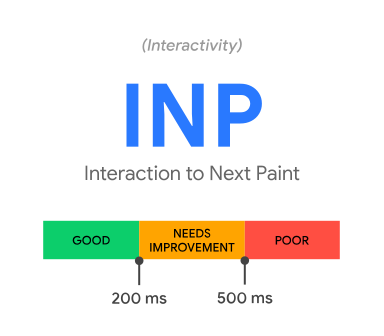
- Good: Up to 200 milliseconds.
- Needs Improvement: Between 200 and 500 milliseconds.
- Poor: Above 500 milliseconds.
Tips to Improve INP:
- Break Long Tasks (Long Tasks): Any JavaScript execution that exceeds 50ms blocks the main thread. Use patterns like
setTimeoutorrequestIdleCallbackto break heavy executions. - Optimize JavaScript Execution: Remove unused code (tree-shaking), defer non-essential scripts with
deferorasync, and re-evaluate the weight of third-party libraries. - Avoid Layout Thrashing: Avoid reading and writing style properties intermittently that force the browser to recalculate the layout multiple times in the same task.
- Use Web Workers: For heavy tasks, consider moving execution to a Web Worker, freeing the main thread to respond quickly to user interactions.
- Prefer CSS for Animations: Whenever possible, use CSS-based animations, which are more efficient and less likely to block the main thread.
3. CLS (Cumulative Layout Shift) — Visual Stability
Do you remember when you were about to click a button and, suddenly, an ad or image loaded, pushed the content down, and you ended up clicking the wrong place?
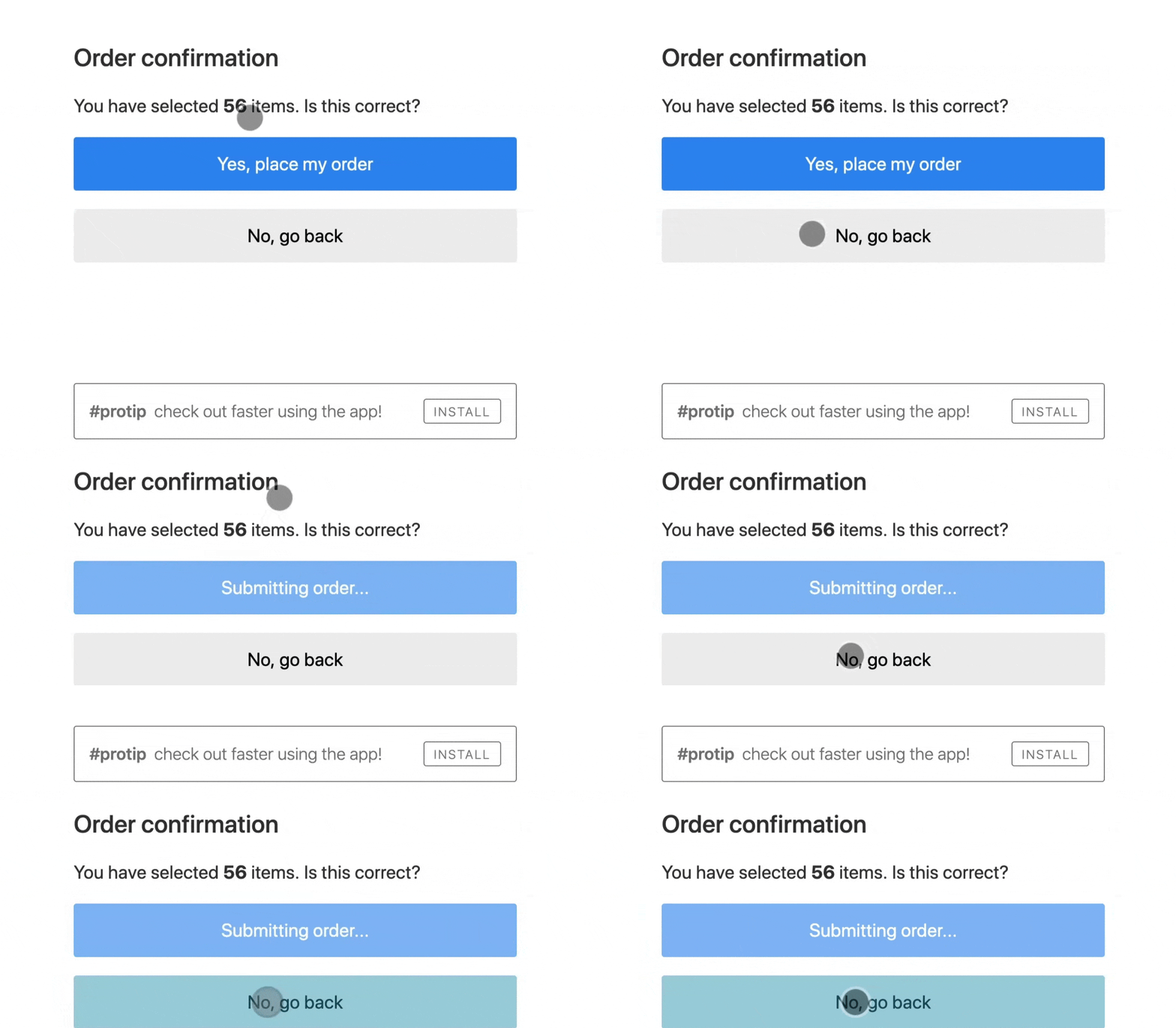
The CLS measures exactly this. It calculates the total sum of all unexpected layout shifts that occur during the page's lifetime.
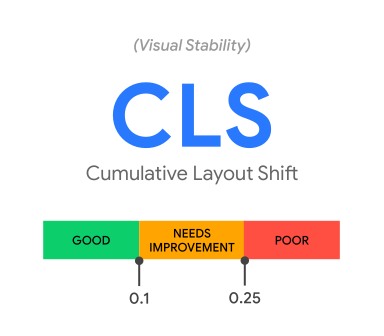
- Good: Less than 0.1.
- Needs Improvement: Between 0.1 and 0.25.
- Poor: Above 0.25.
Tips to Improve CLS:
- Explicit Dimensions: Always define width and height attributes (
widthandheight) in<img>,<video>and<iframe>tags, or use the CSS propertyaspect-ratio. - Reserved Space for Dynamic Elements: Reserve styled space (like loading skeletons or min-height) for ad banners, modals or asynchronously injected content.
- Safe Animations: Prefer properties like
transform(for translation and scaling) over animating layout properties liketop,left,widthorheight. - Avoid Asynchronous Content Injection: Whenever possible, load ads, images and other content synchronously or reserve space for them before they are loaded.
How to Measure Core Web Vitals
To optimize, we first need to measure. The main tools for measurement are:
- PageSpeed Insights: Combines field data (CrUX) and lab data (Lighthouse) into a single detailed report. Link: PageSpeed Insights
- Chrome DevTools (Performance and Lighthouse tabs): Ideal for inspecting bottlenecks locally while you develop.
- Google Search Console: Provides a consolidated report of Core Web Vitals for all indexed pages of your site, grouping issues by metric. Link: Search Console
- Library Web-Vitals (JS): A lightweight library you can install directly in your project to capture user metrics and send them to Analytics tools (Google Analytics, Vercel Analytics, Datadog, etc.). Link: web-vitals package
Core Web Vitals and Modern Frameworks
As we've seen, the Core Web Vitals metrics are essential for user experience and Google ranking, but how do they apply to modern frameworks like React, Vue, and Angular?
By default, these libraries render page content dynamically on the client side with JavaScript, which can negatively impact LCP and CLS.
To mitigate this, it is recommended to use techniques of Server-Side Rendering (SSR) or Static Site Generation (SSG) to deliver pre-rendered HTML to the browser, reducing load times, the size of required JavaScript, and avoiding unexpected layout shifts.
Tools like Next.js, Remix, Astro and Nuxt offer native support for SSR and SSG, allowing you to deliver pages optimized for Core Web Vitals with minimal additional effort.
Benefits of Optimization
Investing time in improving Core Web Vitals brings clear returns across different areas:
- SEO Improvement: Pages that meet the recommended limits of Core Web Vitals gain an advantage in Google's ranking for both mobile and desktop searches.
- Increase in Conversions: Lower loading times and greater stability create a smooth shopping or navigation experience, reducing bounce rates.
- Cost Efficiency: Optimized code and compressed images reduce network traffic, lowering costs with servers and CDN.
Conclusion
Mastering the Core Web Vitals is about understanding that web software engineering goes far beyond just making the code work. It's about how that code impacts the experience of those on the other end of the screen.
By aligning good front-end development practices with the advanced features provided by frameworks like Next.js, Remix and Astro, we can deliver robust applications that are, at the same time, extremely fast and pleasant to use.