Understanding Big O Notation
Recently, I was practicing some exercises on LeetCode and one detail in the instructions caught my attention: "The solution must have a time complexity of O(1), O(n), O(log n) to be considered correct".
In our day-to-day work, we are usually only concerned with solving a problem but rarely think about the complexity and performance of the algorithm.
A loop over an array takes milliseconds to execute, which is almost imperceptible. But as we build large applications with huge amounts of data, this can become a performance bottleneck.
That's why we use Big O Notation to measure the performance of an algorithm.
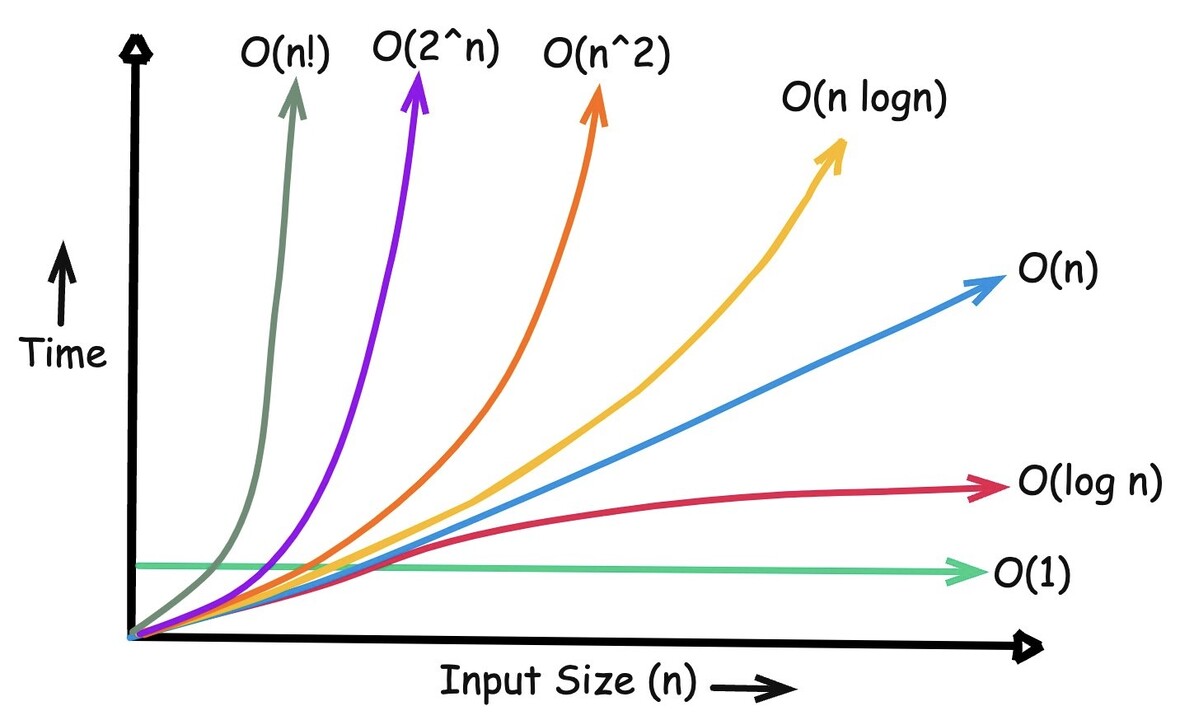
Big O Notation is, essentially, the tool we use to measure the performance of an algorithm. It doesn't measure time in seconds, but rather the growth in the number of operations as the amount of input data (n) increases.
In short, it answers the question: "How much slower will my code become if my user base or data volume grows 1000x?".
Ideally, we want to keep our code at O(1) (Index Lookup), O(log n) (Binary Search), or O(n) (Linear Search), in that order. Let's understand each one of them.
1. O(1) Notation - Constant Complexity
It doesn't matter whether your array has 1 item or 1 million items, the execution time will be exactly the same, O(1).
A classic example is accessing an element directly by its index in an array (O(1)) or looking up a key in an object (O(1)).
function getFirstItem(arr) {
  return arr[0]; // Always makes only 1 operation
}

const fruits = ['apple', 'banana', 'orange', 'strawberry'];
console.log(getFirstItem(fruits)); // 'apple'
2. O(log n) Notation - Logarithmic Complexity
Logarithmic complexity may sound scary because of its name, but the logic behind it is beautiful: at every step, the algorithm cuts the problem in half. The perfect example here is Binary Search.
Imagine you're looking for a word in a physical dictionary; you don't read page by page, you open it in the middle and discard the half that doesn't matter. The same applies to binary search.
Important note: for binary search to work, the list must be sorted.
function binarySearch(arr, target) {
  let start = 0;
  let end = arr.length - 1;

  while (start <= end) {
    let middle = Math.floor((start + end) / 2);

    if (arr[middle] === target) return middle; // Found!

    if (arr[middle] < target) {
      start = middle + 1; // Discard the left half
    } else {
      end = middle - 1; // Discard the right half
    }
  }
  return -1; // Not found
}

const sortedNumbers = [10, 20, 30, 40, 50, 60, 70, 80];
console.log(binarySearch(sortedNumbers, 60)); // Index 5
With each loop, it gets closer to the target, which makes the algorithm traverse fewer items. That's why its complexity is O(log n).
3. O(n) Notation - Linear Complexity
Here, the execution time grows proportionally to the input data. If you have 10 items, you perform 10 operations. If you have 10,000 items, you perform 10,000 operations.
The most common case in our day-to-day work is the good old loop (for, forEach, map, find) iterating through an array to search for or transform data.
function containsItem(arr, target) {
  return arr.find(item => item === target);
}

const numbers = [1, 4, 6, 8, 10];
console.log(containsItem(numbers, 6)); // Runs proportionally to the size of the array
4. O(n log n) Notation - Linearithmic Complexity
This complexity usually appears in efficient sorting algorithms such as Merge Sort or Quick Sort. JavaScript uses this approach under the hood in the native Array.prototype.sort() method.
The logic consists of repeatedly dividing the array in half (log n) and then merging and sorting the elements (n).
// Conceptual example using the native sorting method of JS
function ordenarLista(arr) {
  return arr.sort((a, b) => a - b); // The V8 engine optimizes this to O(n log n)
}

const shuffledNumbers = [5, 1, 4, 2, 8];
console.log(sortList(shuffledNumbers)); // [1, 2, 4, 5, 8]
5. O(n²) Notation - Quadratic Complexity
Quadratic complexity occurs when the execution time grows with the square of the number of elements.
The classic trigger for turning code into O(n²) is having a loop inside another loop (nested loops). For every item in the outer array, you iterate through the entire inner array again. If your list grows even a little, your application will start to struggle.
function findDuplicates(arr) {
  let duplicates = [];
  for (let i = 0; i < arr.length; i++) {
    for (let j = i + 1; j < arr.length; j++) {
      if (arr[i] === arr[j] && !duplicates.includes(arr[i])) {
        duplicates.push(arr[i]);
      }
    }
  }
  return duplicados;
}

console.log(findDuplicates([1, 2, 3, 2, 4, 1])); // [1, 2]
6. O(2^n) Notation - Exponential Complexity
In exponential growth, every new element added to the input doubles the algorithm's workload. A well-known example is the naive recursive implementation of the Fibonacci sequence. Since the function calls itself twice at every level, it generates a huge and redundant call tree.
function fibonacciRecursive(n) {
  if (n <= 1) return n;

  // Two recursive calls for each execution. Avoid this for large numbers!
  return fibonacciRecursive(n - 1) + fibonacciRecursive(n - 2);
}

console.log(fibonacciRecursive(6)); // 8
Combining Complexities
Sometimes we can see a function that combines two complexities, such as O(n) + O(1).
function myFunction(arr) {
  arr[0]; // O(1)
  return arr.map(...); // O(n)
}
In this case, the dominant complexity is O(n), because it takes longer to execute the map than the arr[0] access.
Remember: the complexity with the highest growth rate will always be the dominant one.
Summing Complexities
We can have a function with N loops, for example O(n) + O(n) + O(n). You might think the complexity is O(3n), but in this case we ignore the constant and consider it simply O(n).
function myFunction(arr) {
  // O(n)
  for (let i = 0; i < arr.length; i++) {
    console.log(arr[i]);
  }

  // O(n)
  for (let i = 0; i < arr.length; i++) {
    console.log(arr[i]);
  }

  // O(n)
  for (let i = 0; i < arr.length; i++) {
    console.log(arr[i]);
  }
}
Complexity Time X Space
Besides measuring execution time, we also use Big O Notation to analyze space complexity, which represents the additional memory required by an algorithm in relation to the size of the input.
function sum(arr) {
  let total = 0;

  for (const num of arr) {
    total += num;
  }

  return total;
}
While the size of the input array can grow, the algorithm continues to use only a fixed amount of additional memory. Therefore, its space complexity is O(1). And its time complexity is O(n), because each element of the array needs to be visited once.
Conclusion
Understanding Big O Notation is essential for creating efficient and scalable algorithms in large applications and for identifying performance bottlenecks that can be improved.
Many large companies ask about Big O Notation during technical interviews, and this can be a differentiator for you.
In the next posts, we'll start breaking down algorithm and data structure patterns such as Two Pointers, Sliding Window, and HashMaps.
Knowing the Big O of each one will help you perfectly understand why you would choose one approach over another.